EURO NCAP Crash Avoidance Scenarios
Copyright © 2026, Waterloo Intelligent Systems Engineering Lab, University of Waterloo. All rights reserved.
2026 Euro NCAP crash avoidance scenarios modeled using GeoScenario 2. The scenarios can be executed using GeoScenario Server traffic simulator.
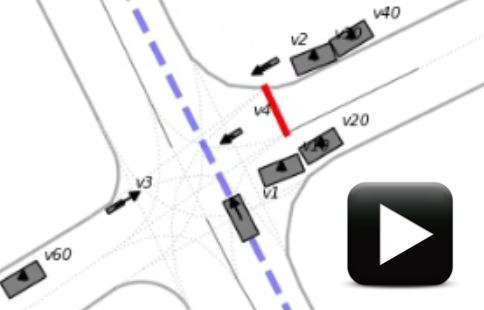
For example, in the screenshot below, the vehicle under test (VUT) v1 is driving forward across the intersection while occluding vehicles are blocking the view of three bicycles (v2, v3, and v4) entering the intersection. The bicycles adjust their speeds to force a collision with the VUT.
Click on the image to watch the video of the scenario execution.
All example scenario runs shown in videos in this repository use a “path vehicle” VUT in order to show the collisions. However, for testing an actual automated driving system, the scenarios can be launched with an “external vehicle” VUT, that is, a vehicle controlled by an external system via, for example, ROS2.
Contributors
Scenarios
For the detailed description of the scenarios and videos of example runs, see scenario_suite/README.md.
Installation
Installing a self-containded binary for any Linux OS (amd64 only)
Install GeoScenario Server to /opt/geoscenarioserver.
- Ensure
curl,tar, andzstdare available. - Execute
curl -fsSL https://wiselab.uwaterloo.ca/wise-sim/opt-geoscenarioserver-install.bash | sudo bash
NOTE: if you have write access to /opt, you can omit sudo.
NOTE: GeoScenario Server must be installed to /opt/geoscenarioserver because it is a conda environment which are not relocatable.
It contains both the standalone and ROS2 server versions.
Usage
- Obtain the scenario suite
Either clone the repository:
git clone https://github.com/wiselabuw/euro-ncap-crash-avoidance-scenarios/
Or download a compressed archive from the GitHub Releases page and extract it.
- change to and source the scenario suite (provides the command
slaunchand allows launching scenarios from any working directory):cd euro-ncap-crash-avoidance-scenarios/scenario_suite source setup.bash - Launch a scenario called
<scenario_name>and, optionally, a number of scenario parts<part_name>.osm*. A list of[<gss_options>*], such as,--no-dash, can be optionally provided as well. Part names and GSS options can be intermixed. Theslaunchcommand provides autocompletion for scenario names, part names, and GSS options by pressing<TAB>key. Pressing the<TAB>key twice shows the list of available options that complete the provided previx.
slaunch

Usage: slaunch <scenario_name> [<part_name>.osm*] [--ros] [<gss_options>*]

Launches the specified scenario with the GeoScenarioServer traffic simulator

Arguments:
     <scenario_name>      name of the folder 'scenarios/<scenario_name>' (mandatory)
     [<part_name>.osm*]   names of the files in the folder 'scenarios/<scenario_name>/parts' (optional list)
     [--ros]              launch ROS2 node geoscenario_server (launch standalone by default)
     [<gss_options>*]     additional options for the GeoScenarioServer (optional list):
                          --no-dash --wait-for-input --wait-for-client --dash-pos --debug --file-log
...
for example, launch a standalone simulation
slaunch NCAP_CPC \                      # base secenario
        occluding_pv30_pv40.osm \       # 3 parts
        right_pp2.osm \
        left_pp3.osm \
        --dash-pos 0 0 960 1080  \      # GSS option
        --wait-for-input \              # other GSS options
        --file-log \
        vut_pv30.osm                    # VUT with speed profile pv30
Copy and paste a single line version of the above command:
slaunch NCAP_CPC occluding_pv30_pv40.osm right_pp2.osm left_pp3.osm --dash-pos 0 0 960 1080 --wait-for-input --file-log vut_pv30.osm
for example, launch the native ROS2 server with a co-simulator
slaunch NCAP_CPC \                      # base secenario
        occluding_pv30_pv40.osm \       # 3 parts
        right_pp2.osm \
        left_pp3.osm \
        --ros \                         # start the native ROS2 server
        --no-dash \                     # other GSS options
        vut_pv30.osm                    # VUT with speed profile pv30
Copy and paste a single line version of the above command:
slaunch NCAP_CPC occluding_pv30_pv40.osm right_pp2.osm left_pp3.osm --ros --no-dash vut_pv30.osm
Each scenario may optionally contain a subfolder parts, which contains the available scenario fragments. For example,
└── NCAP_CPC
    ├── NCAP_CPC.osm                    # base scenario: VUT driving forward across the intersection
    └── parts                           # scenario fragments
        ├── left_pp3.osm                # path pedestrian pp3 entering from the left of VUT
        ├── occluding_pv30_pv40.osm     # occluding vehicles pv30 and pv40 before the crosswalk
        ├── right_pp2.osm               # path pedestrian pp2 entering from the right of VUT
        ├── vut_ev.osm                  # external vehicle under test (VUT)
        ├── vut_pv10.osm                # path vehicle under test (VUT) with different speed profiles
        ├── vut_pv20.osm
        ├── vut_pv30.osm
        ├── vut_pv40.osm
        ├── vut_pv50.osm
        └── vut_pv60.osm
NOTE: scenario fragments cannot be run individually without a base scenario because they are missing the required elements origin and globalconfig.
- Review the scenario execution outputs
Every scenario execution creates a folder with various log files in
scenario_suite/logs/<date>-<time>/
For example,
scenario_suite/logs/2026-03-16-172646/
├── gss_output.log       # console output
├── launch_command.log   # command used to launch the simulation
├── launch_params.yaml   # (ROS2 only) launch command parameters
└── violations.json      # report of collisions, timeouts, and other events
For ROS2, the launch_params.yaml is used to provide values of parameters to ros2 run command.